Disclosure: we build EasyPusher, which is on this list. To keep the comparison fair, every price and limit below comes from each provider's own pricing page or WordPress.org listing, checked on November 6, 2026, and each entry says plainly what that plugin does better than ours.
Our picks at a glance
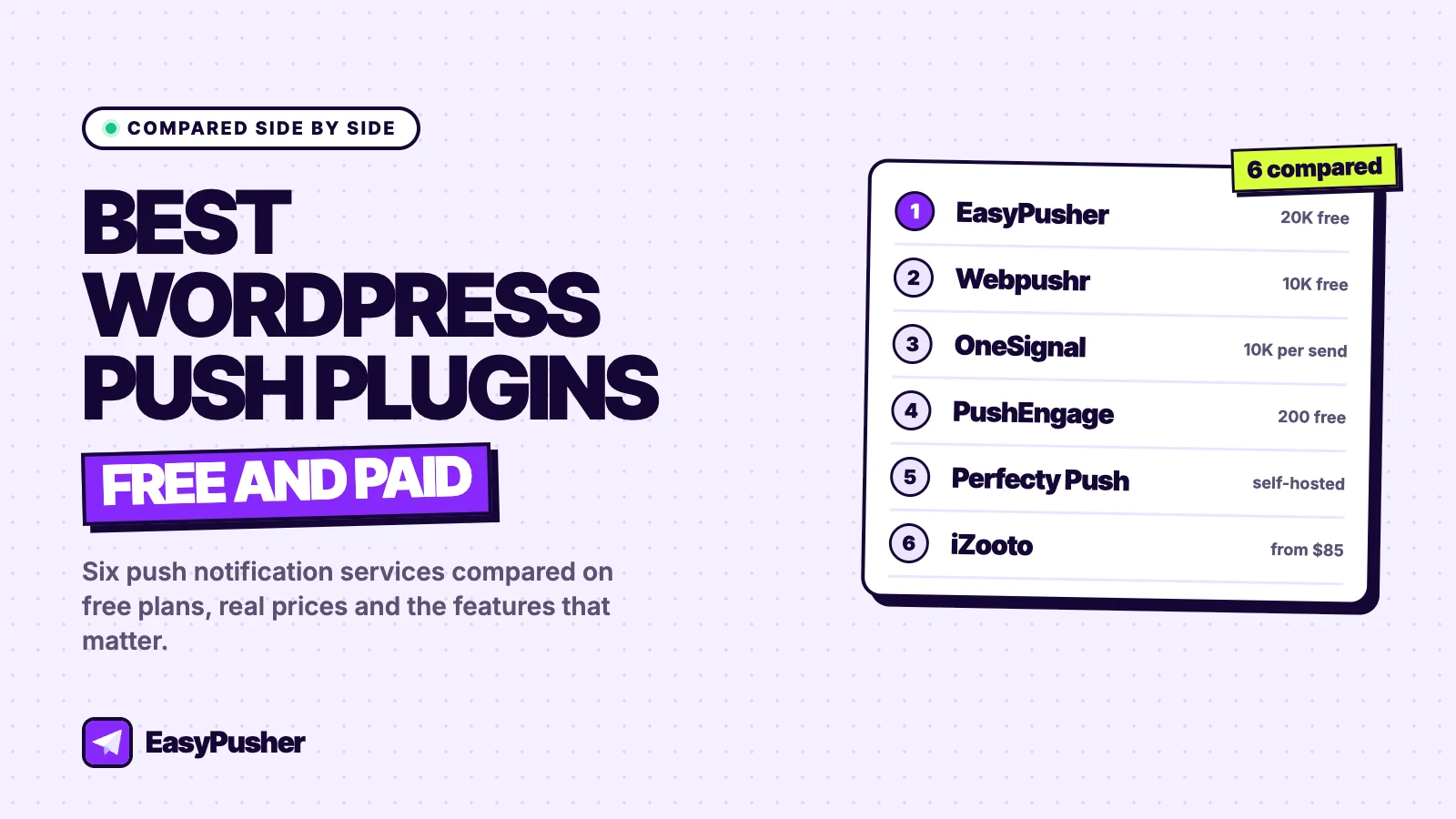
- EasyPusher: the biggest free plan (20,000 subscribers) and flat prices from $7 a month.
- Webpushr: the best free plan if you want new posts sent automatically (10,000 subscribers).
- OneSignal: the best choice for mobile app push, email and SMS alongside web push.
- PushEngage: the best for marketing automation and online stores.
- Perfecty Push: the only fully self-hosted option, with no service to pay for.
- iZooto: built for large publishers, with a free plan paid for by ads.
How we compared WordPress push notification plugins
A WordPress push notification plugin lets visitors subscribe to browser notifications and lets you send them a message, usually about new content or an offer. Almost every option works the same way underneath: the plugin adds a script and a service worker to your site, and a cloud service stores subscriptions and delivers your notifications through the browsers' push services. The differences that matter are elsewhere:
- How far the free plan goes before you have to pay, and what it leaves out.
- What it costs as your audience grows, and whether the price is per subscriber or per tier.
- Automation, especially sending a notification automatically when you publish a post.
- Reliability on WordPress, including how the plugin copes with caching and JavaScript optimisation plugins.
We used published prices and limits only. Where a provider offers a first-year discount, we quote its standard price as well.
1. EasyPusher: the largest free plan with flat pricing
EasyPusher is a web push service built for WordPress publishers. You add your site in the EasyPusher dashboard, install the plugin, paste one API key and choose an opt-in prompt: the browser's own dialog, a soft modal, a slide-in or a floating bell, triggered immediately, after a delay, on scroll or on exit intent. Campaigns are written in the dashboard and can go to everyone or to a segment by country, browser or operating system, now or on a schedule.
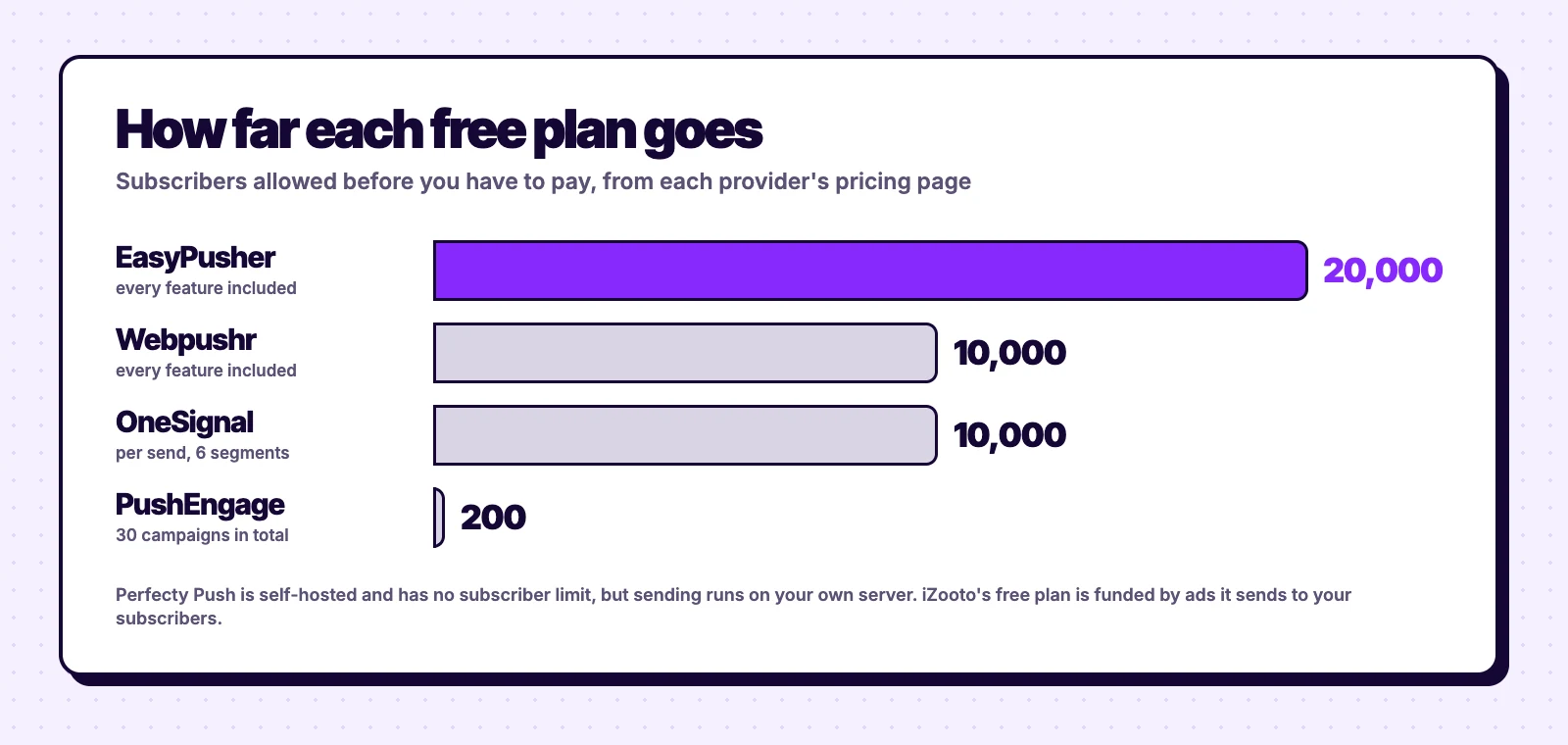
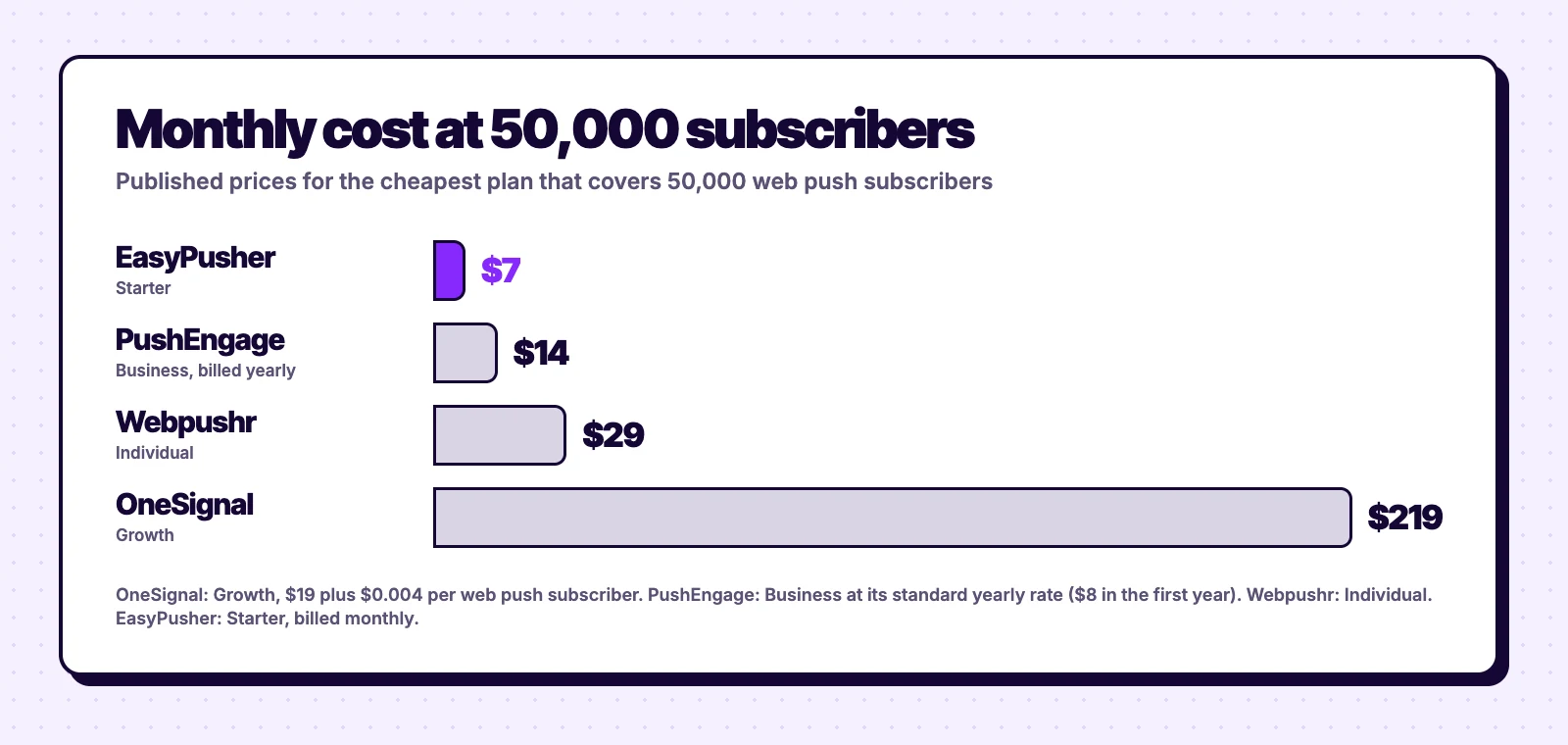
Free plan: 20,000 subscribers per site and 200,000 notifications a month, every feature included. Paid: $7 (50,000 subscribers), $19 (100,000), $49 (200,000) or $99 (500,000) a month, billed monthly.
Strengths
- The largest free plan here, with no features held back
- Flat monthly prices, no per-subscriber charges or annual contract
- Plugin excludes itself from LiteSpeed Cache, WP Rocket and Autoptimize delay features, and restores its service worker if it goes missing
- Sent, delivered, clicked and dismissed counts, with UTM tags on every link
Limitations
- No automatic notification when you publish a post yet
- No drip campaigns, workflows or A/B tests
- Web push only, no mobile app, email or SMS
- Newer, with a smaller install base than OneSignal
Best for: blogs and publishers who write their own campaigns and want to grow past 10,000 subscribers without paying, or pay little.
2. Webpushr: a generous free plan with auto-push on publish
Webpushr's WordPress plugin has more than 10,000 active installs and a 4.7-star rating. Its standout feature for bloggers is that it can send a notification automatically whenever you publish a post.
Free plan: up to 10,000 subscribers with all features. Paid: $29 a month for 50,000 subscribers, $49 for 100,000 and $99 for 150,000.
Strengths
- Automatic notifications for new posts
- All features on the free plan, unlimited notifications
- Unlimited sites and team members
Limitations
- Price jumps from free to $29 a month at 10,000 subscribers
- Costs more than EasyPusher at every paid tier
Best for: blogs under 10,000 subscribers that want hands-off notifications for each new post. Read our Webpushr comparison for the detail.
3. OneSignal: the best multi-channel platform
OneSignal is the most widely used option, with more than 60,000 active installs on its WordPress plugin. It covers web push, mobile app push, email, SMS and in-app messages from one dashboard, and the plugin can send notifications automatically when you publish.
Free plan: web push to up to 10,000 subscribers per send, with 6 segments, 3 journeys and 30 days of reporting. Paid: Growth at $19 a month plus $0.004 per web push subscriber, about $219 a month at 50,000 subscribers.
Strengths
- Every channel in one place, including mobile apps
- Journeys, A/B tests and automatic notifications on publish
- Large install base and documentation
Limitations
- Per-subscriber pricing gets expensive past 10,000 subscribers
- A large dashboard for a site that only needs web push
Best for: products with a mobile app or several channels. See EasyPusher vs OneSignal for a full comparison.
4. PushEngage: the best for marketing automation
PushEngage focuses on automation: drip campaigns, multi-step workflows, A/B tests, and cart and browse abandonment for online stores. Its WordPress plugin has more than 8,000 active installs and includes RSS auto-push for new posts.
Free plan: 200 subscribers and 30 campaigns in total. Paid: Business covers up to 50,000 subscribers at $8 a month for the first year billed yearly, then $14 a month ($19 month-to-month); Premium and Growth start at $15 and $24 a month for the first year.
Strengths
- The deepest automation on this list
- Cart and browse abandonment for stores
- Fairly priced paid plans, several sites on higher tiers
Limitations
- The free plan is effectively a trial
- Yearly billing, with higher prices at renewal
Best for: stores and marketing teams who will use the automation. See EasyPusher vs PushEngage.
5. Perfecty Push: the self-hosted option
Perfecty Push is open source and fully self-hosted: subscriptions are stored in your WordPress database and notifications are sent from your own server, with no third-party account or API key. It can send automatically when you publish and has more than 3,000 active installs with a 4.6-star rating.
Price: free, with no subscriber limit. You pay in server resources instead.
Strengths
- No service fees and no outside data processor
- Automatic notifications for new posts
Limitations
- No Safari or iOS support, according to its listing
- Sending to a large list runs on your own hosting
- Last updated in September 2025 and not tested with recent WordPress releases
Best for: developers and small sites that want everything on their own server and can handle maintenance.
6. iZooto: built for large publishers
iZooto positions itself as an audience platform for news publishers, with web and app push, RSS automation, a notification inbox and exit-intent recommendations. Its WordPress plugin can auto-send when you publish or update a post.
Free plan: a Monetization Plan that is free because iZooto sends native ads to your subscribers, up to two a day. Paid: the Rise plan starts at $85 a month; other plans are by quote.
Strengths
- Publisher features such as recommendations and a news inbox
- Ad revenue from your push audience if you want it
Limitations
- The free plan shows ads to your subscribers
- The most expensive paid entry point here, and no public price list
Best for: large news sites with a budget. See our iZooto alternative guide.
WordPress push notification plugins compared
| Plugin | Free plan | At 50K subscribers | Auto-send posts |
|---|---|---|---|
| EasyPusher | 20,000 subscribers | $7/mo | No |
| Webpushr | 10,000 subscribers | $29/mo | Yes |
| OneSignal | 10,000 per send | About $219/mo | Yes |
| PushEngage | 200 subscribers | $14/mo billed yearly | Yes |
| Perfecty Push | Self-hosted, no limit | Your hosting | Yes |
| iZooto | Ad-supported | From $85/mo | Yes |
How to choose a push notification plugin for WordPress
Start with your audience size
If you expect to stay under 10,000 subscribers, several free plans will do. Between 10,000 and 20,000, EasyPusher is the only one here that stays free with every feature. Past that, compare what each plan costs at your size: per-subscriber pricing such as OneSignal's grows with every new subscriber, while tiered pricing stays flat until the next tier.
Decide whether you need automation
If you want every new post sent without lifting a finger, choose a plugin with auto-push on publish: Webpushr, OneSignal, PushEngage, Perfecty Push or iZooto. If you prefer to write each notification, which often gets better click-through because the message is written for push, EasyPusher's dashboard is the simplest.
Check it works with your caching plugin
JavaScript delay features in LiteSpeed Cache, WP Rocket and similar plugins are a common reason opt-in prompts never appear. Whichever plugin you choose, open your site in a private window after installing it and confirm the prompt shows up.
Think about switching costs
Push subscriptions cannot be exported, but you can still change providers later: subscribers who return to your site can be moved over without a new prompt. Our migration guide explains how.
Our verdict
For most WordPress blogs and publishers, EasyPusher is the best value: free up to 20,000 subscribers and $7 a month at 50,000, with every feature on every plan. Choose Webpushr if automatic notifications for each new post matter more than free-plan size, OneSignal if you need more channels than web push, and PushEngage if automation is the point.
Frequently asked questions
What is the best push notification plugin for WordPress?
It depends on what you need. EasyPusher has the largest free plan (20,000 subscribers) and the lowest prices as you grow. Webpushr is a strong free choice if you want new posts sent automatically. OneSignal suits sites that also need mobile app push, email or SMS, and PushEngage suits stores that want marketing automation.
Is there a free push notification plugin for WordPress?
Yes. EasyPusher is free up to 20,000 subscribers, Webpushr up to 10,000, and OneSignal up to 10,000 subscribers per send. Perfecty Push is free and self-hosted with no subscriber limit, but sends from your own server and does not support Safari.
Which WordPress push plugin sends a notification when I publish a post?
Webpushr, OneSignal, PushEngage, Perfecty Push and iZooto can all send a notification automatically when you publish. EasyPusher does not yet; you write and schedule campaigns in its dashboard.
Do WordPress push notifications work on iPhone?
Yes, on iOS 16.4 and later, but only for visitors who add your site to their home screen and allow notifications from there. Cloud services such as EasyPusher, OneSignal and Webpushr support this; Perfecty Push lists no Safari or iOS support.
Will a push notification plugin slow down my WordPress site?
A well-built one should not. EasyPusher's script is about 15 KB, loads asynchronously from a CDN and adds no database queries to your pages. Self-hosted plugins use your own server to send, which can matter on shared hosting with a large list.
Can I switch WordPress push notification plugins without losing subscribers?
Mostly, yes. Subscriptions cannot be exported, but browser permission belongs to your domain, so a new provider can re-subscribe returning visitors without a new prompt. Remove the old plugin when you install the new one, since only one push service worker can run on your site.
Try the biggest free plan
EasyPusher is free for up to 20,000 subscribers per site, with every feature included. No credit card required.
Start free