Disclosure: we build EasyPusher, so we have a stake in this comparison. Every PushEngage figure below comes from PushEngage's own pricing page and WordPress.org listing, checked on November 6, 2026. PushEngage is cheaper than many people assume and stronger on automation, and we say so where it applies.
Key takeaways
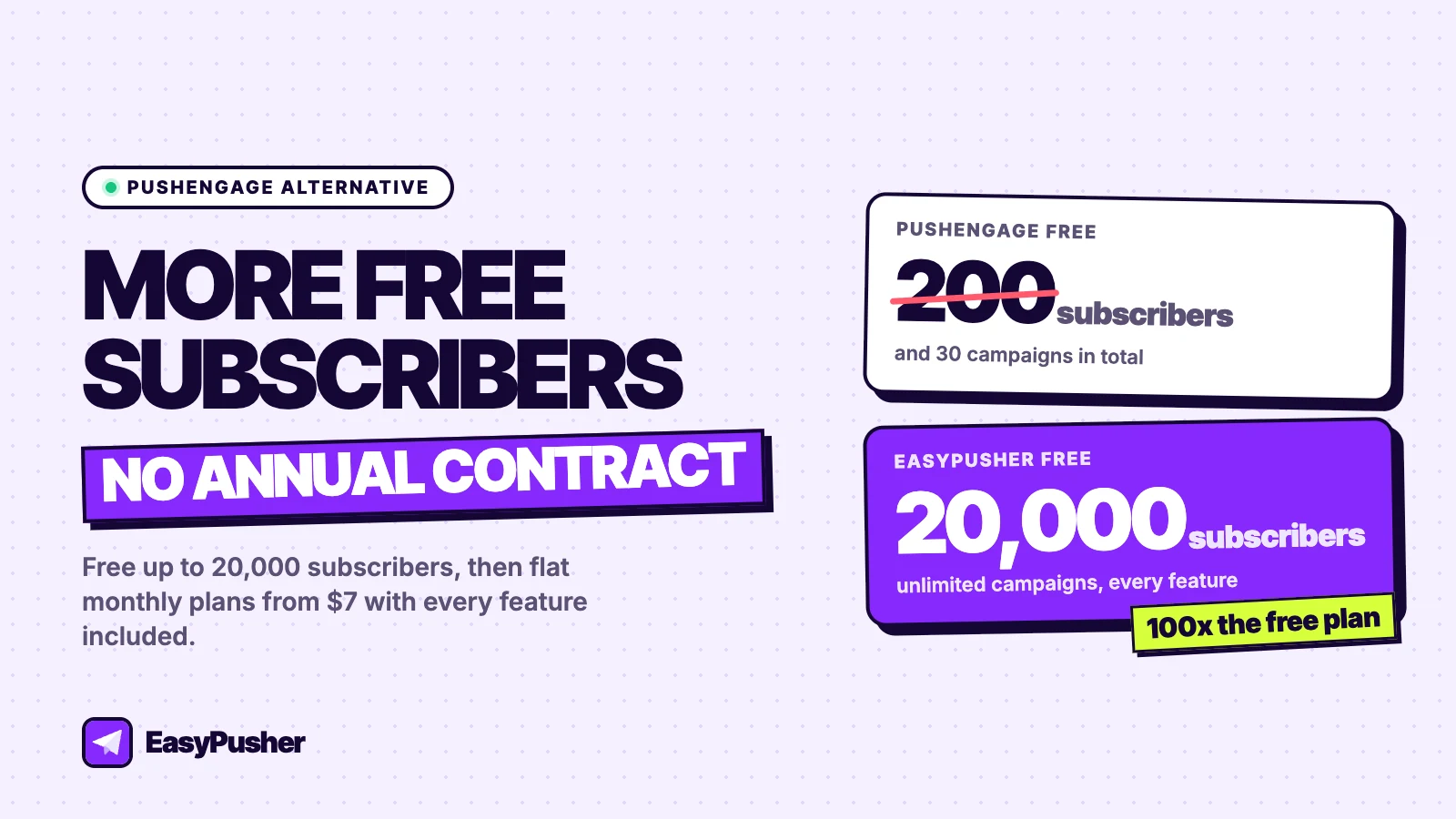
- PushEngage's free plan stops at 200 subscribers and 30 campaigns in total. EasyPusher's free plan covers 20,000 subscribers with unlimited campaigns.
- PushEngage's paid plans are reasonably priced but billed yearly, with a first-year discount and higher renewal prices. EasyPusher is billed monthly at one flat price.
- PushEngage is the better choice if you want automatic notifications for new posts, drip campaigns, A/B tests or cart abandonment.
- EasyPusher suits sites that want a large free allowance, every feature on every plan and no contract, and you can switch without losing returning subscribers.
Why WordPress sites look for a PushEngage alternative
PushEngage is a well-established push notification service with an official WordPress plugin that has more than 8,000 active installs and a 4.3-star rating. It has a broad feature set aimed at marketers and online stores. The reasons sites look elsewhere tend to come down to three things.
The free plan is a trial, not a starting point
PushEngage's free plan allows up to 200 subscribers and 30 campaigns over the life of the account, with one active automation workflow. A blog with modest traffic can collect 200 subscribers in its first week, and 30 campaigns is about a month of daily posts. In practice, the free plan lets you test PushEngage rather than run on it.
Annual billing and renewal prices
PushEngage advertises its paid plans as monthly prices billed yearly, with introductory rates for the first year. Business, for example, is listed at $8 a month for the first year, $14 a month at renewal, or $19 month-to-month. Premium and Growth are listed from $15 and $24 a month for the first year, and the plan cards show "starting at" prices of $29 and $60. None of this is unusual, but it means the price you see is rarely the price you keep paying.
More platform than many sites need
PushEngage's strength is automation: multi-step workflows, drip campaigns, A/B tests, browse and cart abandonment, and audience groups. If you use them, they are worth paying for. If you mostly want to tell readers about new content and the occasional offer, much of the plan you pay for goes unused.
PushEngage pricing vs EasyPusher pricing
Here are both companies' published plans side by side. PushEngage prices are its standard yearly rates, not the first-year discount.
| Plan | PushEngage | EasyPusher |
|---|---|---|
| Free | 200 subscribers, 30 campaigns in total | 20,000 subscribers, 200,000 notifications a month |
| Entry plan | Business: up to 50,000 subscribers, from $14/mo billed yearly ($8 first year, $19 monthly) | Starter: 50,000 subscribers, $7/mo billed monthly |
| Mid plan | Premium: up to 100,000 subscribers, from $29/mo ($15 first year) | Growth: 100,000 subscribers, $19/mo |
| Upper plan | Growth: up to 250,000 subscribers, from $60/mo ($24 first year) | Pro: 200,000 subscribers, $49/mo. Business: 500,000, $99/mo |
| Sites per plan | 1, 2 or 3 | Each site has its own plan |
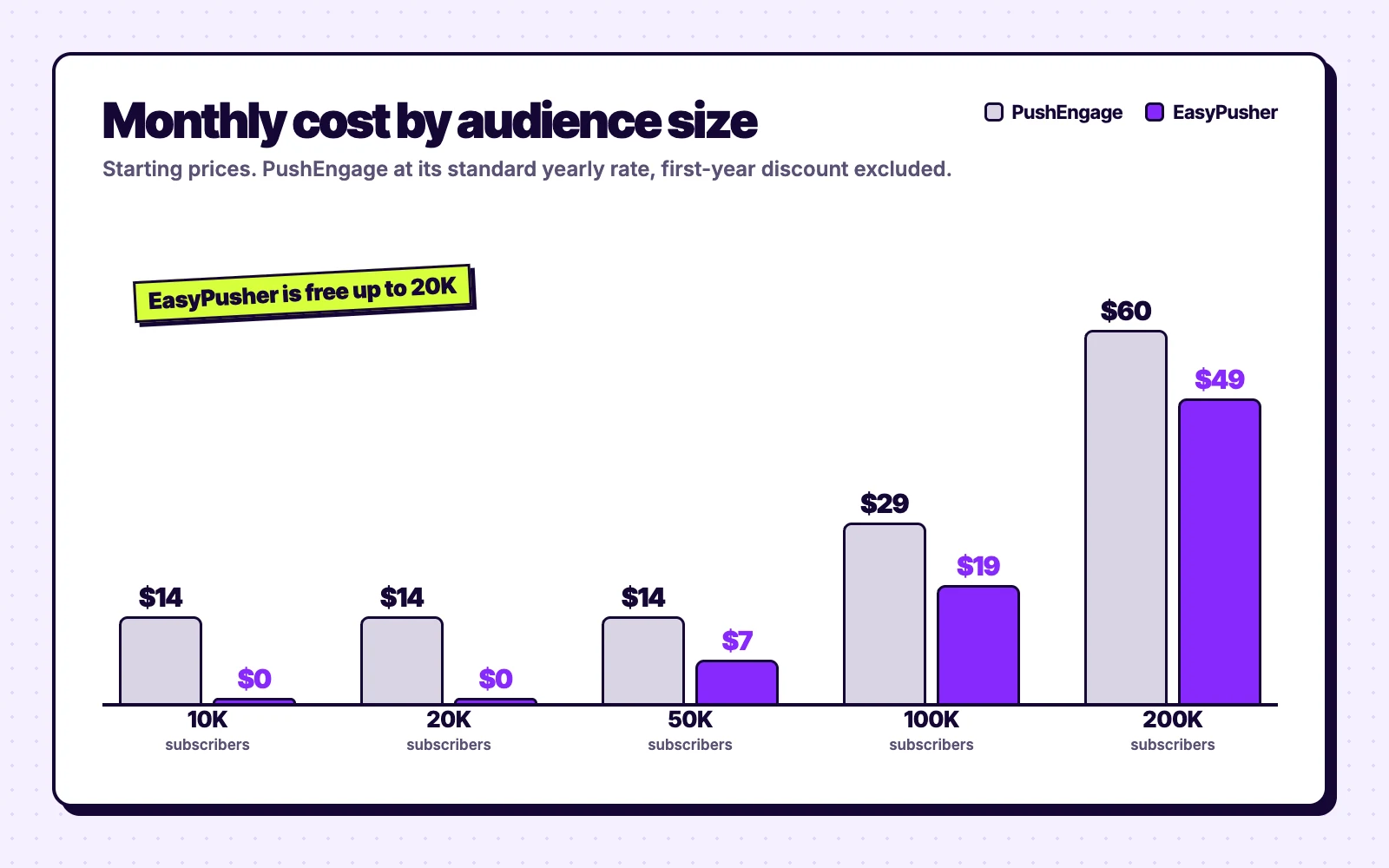
The gap is widest for small and mid-sized sites. Between 200 and 20,000 subscribers, PushEngage needs a paid plan and EasyPusher does not. Past 100,000 subscribers the prices get close, and in PushEngage's first year its discounted rates are lower than EasyPusher's. Two other differences matter: PushEngage bundles more sites into its higher plans, and EasyPusher has a monthly sending ceiling on each plan (600,000 notifications on Starter, 1.5 million on Growth) where PushEngage applies a sending multiple and a fair use policy.
EasyPusher vs PushEngage: features compared
| PushEngage | EasyPusher | |
|---|---|---|
| Free plan | 200 subscribers, 30 campaigns | 20,000 subscribers, unlimited campaigns |
| Billing | Yearly, with first-year pricing | Monthly, one price |
| Segments | Limited per plan (25 on Business) | Unlimited on every plan |
| Scheduling | Yes | Yes |
| Auto-send new posts | Yes, RSS auto-push in the plugin | No, campaigns are sent from the dashboard |
| Drip campaigns and workflows | Yes, more on higher plans | No |
| A/B tests | Premium and above | No |
| Cart and browse abandonment | Growth plan | No |
| Opt-in prompts | Several styles, plus a chat widget | Native, soft modal, slide-in and bell, with delay, scroll and exit-intent triggers |
| Reporting | Campaign and goal analytics | Sent, delivered, clicked and dismissed, with UTM tags on every link |
| WordPress plugin | Official, 8,000+ installs | Official, newer |
What makes EasyPusher a good PushEngage alternative
- A free plan you can run a site on. 20,000 subscribers and 200,000 notifications a month cover most blogs and small publishers for a long time, and nothing is locked: segments, scheduling and full reporting are all included.
- A price that does not change at renewal. Plans are billed monthly at the listed price, and you can move between them or cancel at any time.
- A plugin built to survive caching plugins. EasyPusher excludes its snippet from the JavaScript delay and combine features of LiteSpeed Cache, WP Rocket and Autoptimize, so the opt-in prompt appears on time, and it restores the
ep-sw.jsservice worker if the file goes missing. - A focused dashboard. Write a title and message, add a link, an icon and an optional large image, pick a segment by country, browser or operating system, and send now or schedule.
EasyPusher vs PushEngage: setup, privacy and performance
Setup
Both need an account and both have an official WordPress plugin. With PushEngage you connect the plugin to your PushEngage account and configure prompts and campaigns, in its dashboard or partly inside WordPress. With EasyPusher you add your site in the EasyPusher dashboard, paste one API key into the plugin and pick a prompt style; campaigns are written in the dashboard, and subscriber stats also appear on a Stats page in WordPress.
Privacy
Both are cloud services that store push subscriptions on their own servers as your data processor, so either way you should mention push notifications in your privacy policy. For each subscriber EasyPusher keeps only the push endpoint and keys, the browser, operating system and country, and when they were last seen. It collects no names or email addresses.
Performance
EasyPusher's script is about 15 KB, loads asynchronously from Cloudflare's CDN and adds no database queries to your front-end pages. PushEngage's script also loads asynchronously. Installed correctly, neither should make a measurable difference to page speed.
How to switch from PushEngage to EasyPusher
You cannot export push subscriptions from PushEngage, but you do not need to. Notification permission belongs to your domain, so when a subscriber who already allowed notifications returns to your site, EasyPusher subscribes them again in the background without a prompt.
- Create a free EasyPusher account, add your site and copy its API key.
- Deactivate the PushEngage plugin and install EasyPusher in the same sitting. Only one push service worker can control your site, so the two should not run together.
- Keep your PushEngage account for about 30 days so you can still reach subscribers who have not visited since the switch.
- Cancel PushEngage once the EasyPusher subscriber count has levelled off. If you are on a yearly plan, time the switch for your renewal date.
Our push notification migration guide covers the details, including the cases where subscribers have to opt in again.
When PushEngage is the better choice
Choose EasyPusher if
- You want to stay free past 200 subscribers
- You prefer monthly billing with no renewal jump
- You write and schedule campaigns yourself
- You want unlimited segments on every plan
Choose PushEngage if
- You want new posts sent as notifications automatically
- You rely on drip campaigns, workflows or A/B tests
- You run a store and need cart abandonment
- You want several sites under one yearly plan
Our verdict
PushEngage is a capable, fairly priced tool for marketers who use its automation. Its weak spot is the start: a free plan of 200 subscribers means paying almost immediately, and yearly billing with renewal prices makes the true cost harder to see.
If you want a free plan that covers 20,000 subscribers and simple monthly pricing after that, EasyPusher is the better fit. If automation is the reason you want push notifications, PushEngage is worth its price.
Frequently asked questions
Is EasyPusher better than PushEngage?
It depends on what you need. EasyPusher has a far bigger free plan (20,000 subscribers against 200) and flat monthly pricing with every feature included. PushEngage is better if you want automatic notifications for new posts, drip campaigns, A/B tests or cart abandonment.
How much does PushEngage cost?
PushEngage has a free plan for up to 200 subscribers and 30 campaigns. Its Business plan covers up to 50,000 subscribers and is listed at $8 a month for the first year billed yearly, $14 a month at renewal, or $19 month-to-month. Premium and Growth start at $15 and $24 a month for the first year, according to its pricing page on November 6, 2026.
Is PushEngage free?
PushEngage has a free plan, but it is limited to 200 subscribers, 30 campaigns over the life of the account and one active workflow. EasyPusher's free plan covers 20,000 subscribers and 200,000 notifications a month with no campaign limit.
Can I move my PushEngage subscribers to EasyPusher?
Push subscriptions cannot be exported from any provider, but subscribers who allowed notifications on your domain are re-subscribed by EasyPusher in the background when they return to your site, without a new prompt.
Does EasyPusher send notifications automatically when I publish a post?
Not yet. EasyPusher campaigns are written and scheduled in the dashboard. If automatic notifications for new posts are essential, PushEngage's RSS auto-push does that today.
Can I run PushEngage and EasyPusher together?
No. Only one push service worker can control your site, so two providers on the same pages keep replacing each other. Deactivate PushEngage when you install EasyPusher, and keep the PushEngage account for about a month to reach subscribers who have not returned yet.
Try EasyPusher free
Up to 20,000 subscribers per site with every feature included. No credit card required.
Start free