Disclosure: we build EasyPusher, a web push service, so we have a view on this. Email benchmarks below come from Mailchimp's published email marketing benchmarks, and our push figures come from EasyPusher's own delivery data across more than 1.68 million notifications. We are not going to tell you to stop sending email.
Key takeaways
- Click rates are closer than most articles claim. Mailchimp reports an average email click rate of 2.62%; across EasyPusher, about 2 in every 100 notifications sent are clicked.
- Push wins on sign-up friction and speed: one click, no personal data, on screen within seconds.
- Email wins on depth and ownership: long content, a list you can export and take anywhere, and an inbox that keeps your message.
- For most WordPress sites the answer is both: push for new posts and time-sensitive news, email for newsletters and longer relationships.
How web push notifications and email marketing differ
An email lands in an inbox, next to everything else your reader received that day, and waits there until they open it. A web push notification is a short message, a title, a line of text, an icon and sometimes an image, that the browser shows on the desktop or phone screen like an app alert, even when your site is not open. One click takes the reader to the page you linked.
That difference in format shapes everything else. Email is a place to say a lot to people who chose to hear from you. Push is a tap on the shoulder: very good at "there is something new, come and look", and poor at anything that needs more than a sentence.
Building a list: one click versus a form
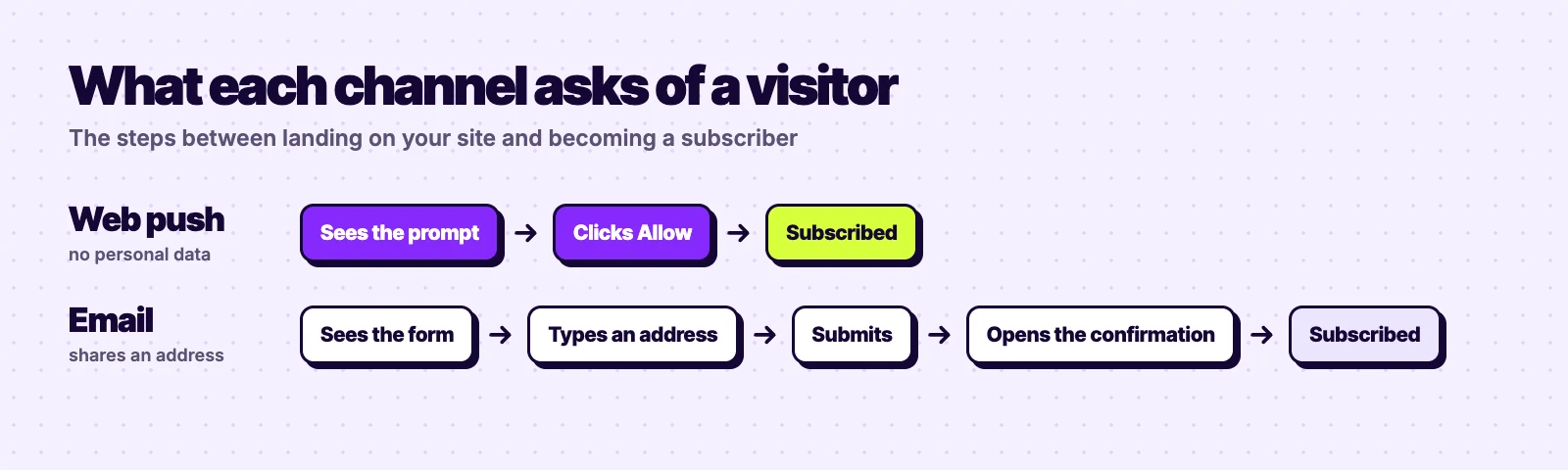
To join an email list, a visitor has to type their address, submit a form and often confirm it from their inbox. Each step loses people. To subscribe to push, they click Allow on a prompt and they are done, without sharing a name or an email address. That is why push lists usually grow faster than email lists from the same traffic.
The catch is that browsers protect that prompt. Chrome and other browsers show quieter prompts on sites where most visitors decline, and a visitor who clicks Block cannot easily be asked again. Asking at the right moment, for example after someone has read part of an article, matters more for push than for email. EasyPusher lets you show a soft prompt first and trigger it after a delay, a scroll depth or on exit intent, so the browser's own dialog only appears to people who have shown interest.
Opens and clicks: what the numbers really say
Many comparisons claim push notifications have "90% open rates" and click rates of 10 to 20%. Be careful with these. A push notification has no "open": it is shown on screen or it is not, so a view rate is mostly a measure of delivery. And click rates that high are rare outside small, very engaged lists.
Here is what we can actually measure. Mailchimp's benchmarks put the average email open rate at 35.63% and the average click rate at 2.62% across all its users. Open rates have been inflated since Apple Mail Privacy Protection started loading images automatically, so the click rate is the fairer number. Across all notifications sent through EasyPusher, roughly 2% are clicked.
| Measure | Web push | |
|---|---|---|
| Average click rate | 2.62% of emails delivered (Mailchimp) | About 2% of notifications sent (EasyPusher) |
| Open rate | 35.63%, inflated by Apple Mail privacy features | No real equivalent; a notification is shown on delivery |
| Time to reach the reader | When they next check their inbox | Seconds, if their device is online |
| How long the message lasts | Stays in the inbox | Disappears once dismissed or replaced |
So click rates per message are similar. What differs is how many subscribers you collect, how fast the clicks come, and how often people are willing to hear from you. Push clicks arrive in a burst within minutes of sending, which is exactly what you want for a new article or a time-limited offer.
Deliverability: spam folders versus notification settings
Email deliverability is a discipline of its own. You need SPF, DKIM and DMARC set up on your domain, a good sending reputation and clean lists, and even then marketing email often lands in a Promotions tab or spam folder.
Push has no spam folder. Notifications are delivered through the browser makers' push services, and if the subscriber's browser is reachable, the notification arrives. It has its own limits, though. People can switch notifications off in their browser or operating system, focus modes hide them, and a subscription stops working if someone clears their browser data or stops using that browser. A good push service removes dead subscriptions automatically; EasyPusher reports how many notifications were sent, delivered, clicked and dismissed for each campaign, so you can see the real reach.
Who owns the list
This is email's strongest advantage, and it is often left out. An email list is a set of addresses you can export and import into any other email platform. A push subscriber list cannot be exported: each subscription belongs to one browser and is tied to your push provider's key.
You are not locked in completely. Notification permission belongs to your domain, so if you change push providers, subscribers who come back to your site can be re-subscribed by the new provider without a new prompt. Our migration guide explains how. But a push list is less portable than an email list, and it is worth knowing that before you choose.
Cost and effort
Email platforms usually price by the number of contacts and the features you need. Their free plans tend to be small: MailerLite's free plan, for example, covers 250 subscribers and 2,500 emails a month. Push services also price by subscribers, but the numbers are different. EasyPusher's free plan covers 20,000 subscribers and 200,000 notifications a month, and 50,000 subscribers cost $7 a month.
Effort differs too. A good newsletter takes hours: writing, design, testing. A push notification is a headline, a sentence and a link, which you can write in a couple of minutes. The flip side is that a push notification only works if there is something worth clicking through to.
When to use web push, email, or both
Web push is better for
- New post and breaking news alerts
- Flash sales and offers with a deadline
- Reaching visitors who will not share an email address
- Quick traffic in the minutes after you publish
Email is better for
- Newsletters and long-form content
- Welcome sequences and onboarding
- Receipts, account and transactional messages
- A list you want to own and move between platforms
A simple way to run both on a WordPress site
- Offer push first. Show a soft push prompt to engaged readers. It costs them one click.
- Keep your email form for readers who want more depth, such as a weekly digest or a lead magnet.
- Send a push notification for each important new post, with a clear headline and the post's featured image.
- Send email less often but longer: a weekly or monthly roundup of what you published.
- Compare results in Google Analytics. EasyPusher adds UTM tags to every notification link, so push traffic shows up as its own source next to email.
Our verdict
Web push is not a replacement for email, and its click rates are not magic. Its real advantages are that far more visitors will subscribe, the message arrives in seconds, and sending costs almost nothing in time or money.
Email remains the better channel for depth and the list you fully own. If you publish regularly on WordPress, run both: push to bring readers back the moment you publish, email to keep the relationship going.
Frequently asked questions
Are push notifications better than email marketing?
Neither is better at everything. Push notifications are easier to subscribe to and reach readers in seconds, which makes them better for new posts and time-sensitive offers. Email is better for long content, onboarding and a list you can export and own. Most publishers get the best results from using both.
What is the average click rate for web push notifications?
It varies a lot by site and audience. Across all notifications sent through EasyPusher, about 2% are clicked, which is close to Mailchimp's reported average email click rate of 2.62%. Claims of 10 to 20% click rates are rare outside small, highly engaged lists.
Do web push notifications have an open rate?
Not in the way email does. A push notification is shown on screen when it is delivered, so a so-called view rate mostly measures delivery. Clicks are the meaningful number to track.
Can push notifications go to spam?
No, there is no spam folder for web push. But subscribers can turn notifications off in their browser or operating system, and focus modes can hide them, so not every delivered notification is seen.
Can I export my push notification subscribers like an email list?
No. A push subscription belongs to one browser and is tied to your provider's key, so it cannot be exported. If you change providers, subscribers who return to your site can be re-subscribed without a new prompt.
Do I need a subscriber's email address for push notifications?
No. Visitors subscribe by clicking Allow in their browser, with no name or email address. EasyPusher stores only the browser's push endpoint and keys, the browser, operating system and country.
Add web push next to your email list
EasyPusher is free for up to 20,000 subscribers per site, with every feature included. No credit card required.
Start free